
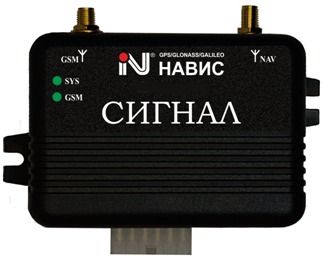


The SIGNAL S-2115 by NVS is a mobile set of equipment designed for automotive wireless alarm and monitoring. It operates on the signals of SNON GLONASS / GPS / GALILEO / SBAS, utilizing the certified receiver NV08C manufactured by ZAO KB NAVIS. This mobile kit is equipped with an open protocol of information exchange, allowing for seamless integration into any existing navigation and information systems.
Recommended for use in monitoring and dispatching systems of land vehicles, the SIGNAL S-2115 has been awarded the GLONASS / GNSS-Forum Test Certificate No. 06I-2011. This certification ensures its reliability and accuracy in providing real-time tracking and monitoring capabilities. Additionally, the package includes free transport monitoring software, making it a comprehensive solution for fleet management and vehicle tracking needs.
Key Features:
- Mobile set of equipment operating on SNON GLONASS / GPS / GALILEO / SBAS signals
- Certified receiver NV08C manufactured by ZAO KB NAVIS
- Automotive wireless alarm and monitoring system
- Open protocol of information exchange for integration into existing navigation systems
- Recommended for monitoring and dispatching systems of land vehicles
- GLONASS / GNSS-Forum Test Certificate No. 06I-2011
- Includes free transport monitoring software
Set Up SIGNAL S-2115
To set the tracker send the following commands by SMS messages, the sample setup the device password is bX1BH2, this password is the default
-
Factory reset
beginbX1BH2 -
Set the time zone UTC-0
time zonebX1BH2 0 -
Set the operator APN
apnbX1BH2 {{apn}} -
Set the username and password of APN operator
upbX1BH2 {{apnu}} {{apnp}} -
Set the GPRS server
adminipbX1BH2 54.85.159.138 8888 -
Switch to GPRS mode
Yq8nFdIIfZ,1,1
or
Yq8nFdIIfZ
To check settings checkbX1BH2


